Docs · Get started
How Afterdeck works
The simple idea behind decks that look designed, plus a glossary of every word you'll see.
You don't need to know how Afterdeck works to use it. But a few minutes here will make everything else click, and the glossary at the bottom is a handy reference whenever a term trips you up.
The core idea
AI is brilliant at writing web pages and clumsy at writing slide files. Afterdeck leans all the way into that. Instead of generating a PowerPoint directly, Agent designs each slide as a polished web page, the same medium award-winning websites are built in. That's where the craft comes from: real typography, considered spacing, layouts arranged for the content instead of forced into a fixed grid.
The slide file only appears at the very end, when you export. At that moment Afterdeck translates the web design into Slides or PowerPoint, keeping the look intact. We call that handoff point the export seam.
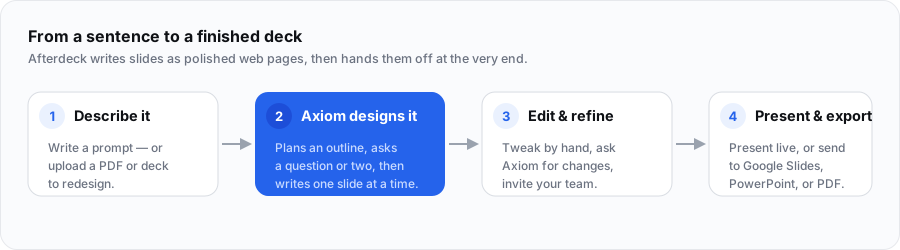
Two ways to start
- New deck builds a fresh deck from a prompt, or a prompt plus reference files.
- Beautify takes an existing PDF or PowerPoint and restyles it. Your words stay put and the design gets rebuilt from scratch.
You pick between them with a toggle on the Create page. More in Creating a deck and Beautify.
What happens when you generate
When you press Design, three things happen in order:
- Planning. Agent reads your brief and outlines the whole deck.
- Questions (sometimes). If an answer would meaningfully change the deck (tone, audience, scope) it asks one to four quick questions. Often it asks none. You can always skip.
- Writing. It designs the slides one at a time. Finished slides are fully editable immediately, so you can start working while the rest stream in.
The full play-by-play, including what to do if something goes wrong, is in Creating a deck.
Editable vs. locked
This is the one concept worth really understanding, because it shapes how you edit and export.
Every element on a slide is either editable or locked:
- Editable content is body text, bullets, and content photos. You, your collaborators, and anyone opening the export in Slides or PowerPoint can change it, because it arrives as real text boxes and images.
- Locked design is the hero headlines, decoration, and backgrounds. That's the art, so on export it freezes into a crisp image and the deck always looks exactly as designed.
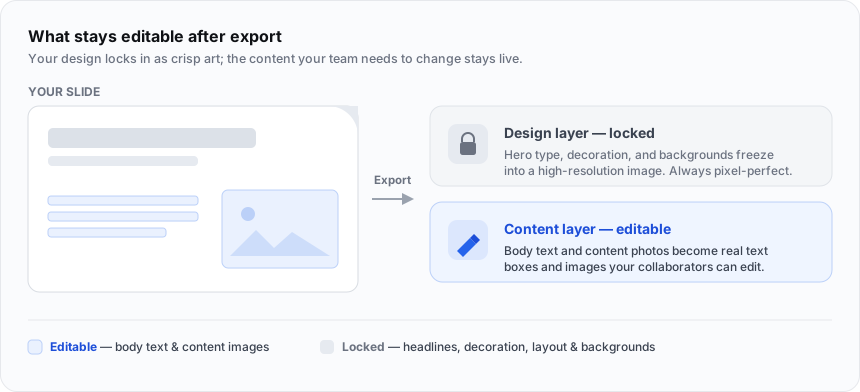
Inside the Afterdeck editor you can adjust almost anything. The editable/locked split mainly governs what stays editable after you export and what collaborators can change on a shared deck. See Exporting for the details.
Credits, in one line
Generating decks and a few premium AI actions spend credits; reading, presenting, sharing, and editing text by hand are free. New accounts get 200 credits, plans add monthly credits, and packs top you up. Full details in Credits, plans & billing.
The words we use
| Term | What it means |
|---|---|
| Agent | The AI inside Afterdeck. It plans, designs, edits, and answers questions. |
| Deck | Your set of slides. |
| New deck | Make a fresh deck from a prompt. |
| Beautify | Upload an existing deck and have Agent restyle it. |
| Brand | The look you start from. Pick a ready-made one, or build your own in Brand Studio. |
| Brand | Your own reusable kit of exact colors, fonts, and logo. |
| Credits | What you spend to generate and run premium AI actions. |
| Plan | A subscription (Plus, Pro, Max) with monthly credits and unlocked features. |
| Credit pack | A one-time credit top-up (Spark, Lift, Scale, Summit). |
| Magic Animate | AI-choreographed cinematic transitions between slides. |
| Ghost mode | A private, temporary deck that's never saved to your library. |
| Workspace | A shareable container for organizing decks, with folders inside. |
| Share link | A link that lets anyone view and present a deck. |
Keep going
Quickstart Make your first deck right now.
Creating a deck The full generation flow, explained.