Docs · Present & export
Exporting
Hand your deck off as a share link, PDF, PowerPoint, or Google Slides, with your design intact and your content editable.
When a deck is ready to leave Afterdeck, click Export in the top bar. You can share a view-only link, download a PDF or PowerPoint, or send the deck straight to Google Slides. The clever part: your design stays pixel-perfect while the content your team needs to edit comes through as real, editable objects.
Pick a format
| Format | Best for |
|---|---|
| Share link | Letting anyone view and present, no account needed. |
| Pixel-perfect read-only sharing and printing. | |
| PowerPoint (.pptx) | Teams on Office, or offline editing. Editable text and images come through as native objects. |
| Google Slides | Real-time collaboration. Opens straight in your Drive. |
PowerPoint export is marked Beta. It's the most faithful editable format and improving steadily.
Choose a resolution
For PDF, PowerPoint, and Google Slides you'll pick a quality:
- Standard is 1920×1080. Fastest, and the smallest file.
- Higher resolution is 4K. Crisp on any screen.
- Maximum resolution is 6K. Sharp on a big projector.
Exporting itself never costs credits.
What stays editable
This is the heart of Afterdeck's export. Each slide's design is rendered as a crisp image so it always looks exactly as designed. Then your editable content is re-added on top as real text boxes and pictures.
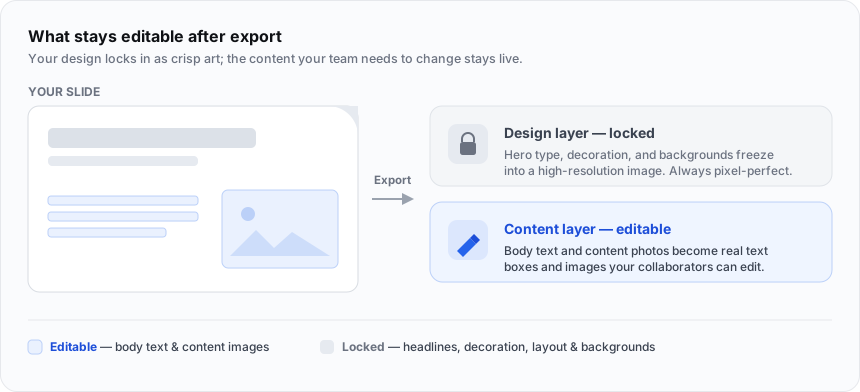
So after export, collaborators can rewrite your bullets and swap your photos, but they can't accidentally break the layout, headlines, or decoration. A PDF or share link freezes the whole slide as-is. Nothing is editable, which is exactly what you want for read-only sharing.
Google Slides
The first time you export to Google Slides, you connect your Google account once:
-
Choose Google Slides and click Connect Google Account. A Google sign-in window opens.
-
Approve access. Afterdeck only asks for permission to the files it creates, so it can't see anything else in your Drive.
-
Export. The deck is saved to your Drive as a native Slides file, and Open in Google Slides takes you right to it.
After that, exports go straight through. You can disconnect anytime from the export screen or in Settings.
A note on fidelity
For the most faithful output, use PDF or present directly from Afterdeck. Both show the slide exactly as designed. Choose PowerPoint or Google Slides when your team needs to edit the content and a little font drift is an acceptable trade.
Speaker notes
Your speaker notes export to PowerPoint and Google Slides (they show in presenter view there). PDF export doesn't include notes.
Next steps
Presenting Skip the file and present live.
Troubleshooting Fix export and Google connection issues.